


Snipd | AI Podcast Player
4.0187.00 Reviews
App Specs
- Version
- 3.6.99
- Updated On
- License
- Free
- Downloads
- 100,000+
- Developer
- Snipd | Highlight & Take Notes with AI
- Categories
- Music & Audio
- Platform
- Android
Screenshots
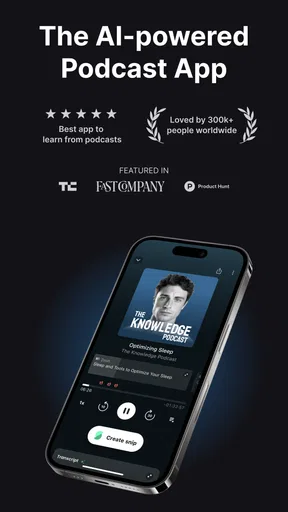
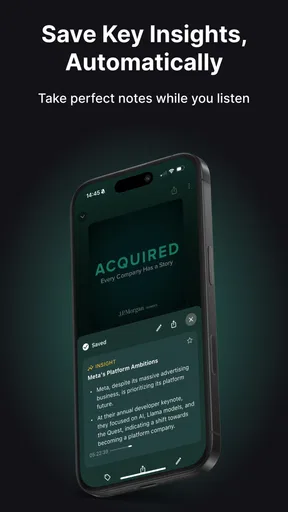
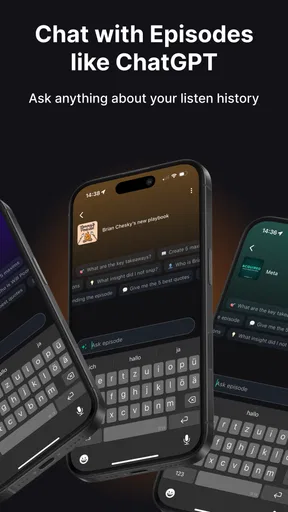
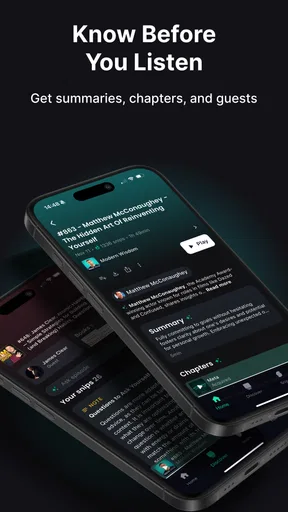
 Analysis by AppCompare
If you’re deciding whether Snipd | AI Podcast Player belongs in your listening routine, I’d start with one question: do you want to do more with an episode than play it and move on? Snipd is a music and audio app from Snipd | Highlight & Take Notes with AI, built around listening, saving useful moments, and returning to ideas later. That focus can be valuable if podcasts are part of how you learn or keep up with a subject. It may feel like extra work if you simply want a basic player and rarely revisit what you hear.
Where the first friction can appear
The app’s promise is appealing, but the useful part of a podcast workflow depends on small habits: finding a good episode, remembering to save a moment, and knowing where to look for it afterward. If you install it expecting every episode to turn into a perfectly organized set of notes without any input from you, you may be disappointed. I’d treat it as a listening companion that can help you capture ideas, not as a replacement for paying attention or deciding what matters.
Search and discovery can also be a source of friction. A smaller or less familiar show may be harder to locate than a widely known one, so it helps to try a distinctive show or episode title rather than a broad subject phrase. If a search does not surface what you expect, I’d check the spelling and narrow the wording before assuming the podcast is unavailable. That simple change is often more useful than repeatedly trying the same vague query.
Before you build a routine
I’d begin with a single show you already enjoy, rather than importing a long list of interests into your listening life all at once. Listen to an episode, save one moment that genuinely seems worth revisiting, then return to it later. This tests the central idea in a low-effort way and helps you decide whether collecting snippets suits you. If you save everything, your library can become another queue to manage; being selective makes the saved material easier to use.
It is also worth checking that you are signed into the account and device setup you intend to keep using before investing time in a large personal collection. For any audio app, basic checks such as a stable connection when browsing, enough device storage for downloads, and a current app installation can prevent avoidable confusion. Snipd’s current version is 3.6.99, and it is listed for Android 7.0 or later. The app is free to install, with in-app purchases ranging from $8.99 to $95.90 per item, so I would review the purchase details in the app before committing to anything paid.
A practical listening-and-revisit workflow
A realistic use case is a walk or commute when an episode covers an idea you want to bring into a work conversation. Rather than trying to remember the exact point afterward, you can make a snippet while listening, then use your saved collection as a prompt when you have time to think. The practical benefit is not just keeping a clip; it is creating a small bridge between passive listening and an action, such as writing down a question or sharing the moment with a friend.
For a more deliberate routine, I’d keep the number of saved moments per episode modest. One strong passage is usually easier to revisit than a pile of near-duplicates. I’d also give a snippet a quick review soon after saving it: if the context is unclear, return to the surrounding part of the episode while the topic is fresh. That little check can make a saved clip more useful later, especially when the speaker’s point depends on what came just before it.
Worth Reading Before You Choose

EA SPORTS FC Mobile 26 Is a Bigger Football Game, but It Takes Time

Flipboard Shows What News Apps Must Do Beyond the Feed

Switching to Android Auto Means Rethinking Your Driving Routine

Google Calendar Makes a Crowded Week Easier to Manage

Ludo King Makes the Most of the Minutes Between Plans

Baby Panda World Brings Quick Play to Modern Phones, but Its Game Library Feels Busy
The app is most appealing to listeners who follow interviews, discussions, or educational shows and often want to recall a specific idea. It is less compelling if you mainly use podcasts as background sound, prefer a simple play-and-forget setup, or do not want another personal library to maintain. People who already take detailed notes elsewhere may also find that saving clips duplicates their existing system unless they choose one clear purpose for Snipd, such as collecting memorable examples or useful explanations.
How it fits beside other listening options
Compared with a conventional podcast player, Snipd puts more emphasis on capturing and revisiting parts of an episode. A standard player may be the better choice if your priorities are a familiar queue and uncomplicated playback. Compared with writing notes by hand, saving a segment can preserve the speaker’s actual words and make it easier to return to the source, though it still takes judgment to decide which moments deserve attention. I see the difference as a trade-off: Snipd can make listening more active, but that extra layer only pays off if you use it.
Its AI-oriented approach is another reason to try it with realistic expectations. Suggestions can help when you are open to exploring, but recommendations are not a substitute for searching directly for a particular guest, subject, or show. If the feed starts to feel repetitive, I’d deliberately try a new topic or search for a specific episode instead of waiting for the app to guess what I want. That keeps discovery from becoming a loop of similar suggestions.
When a problem may be outside the app
If an episode will not load or a download seems incomplete, I would first separate a network issue from an app issue: try browsing again on a reliable connection, then check whether the same problem occurs with another episode. For offline listening, downloading before leaving a dependable connection is a sensible habit. If playback is choppy on an older device, closing other demanding apps and restarting the player are reasonable basic troubleshooting steps; persistent slowness may reflect the device as much as the listening app.
Likewise, if a clip seems difficult to find later, check the place where you saved it and make sure you are using the same account and device context as before. Avoid repeatedly saving the same moment while trying to diagnose a delay, since that can create clutter without clarifying what went wrong. Small, reversible checks make it easier to tell whether the issue is a connection, a search habit, or the way the library is being used.
First Impressions
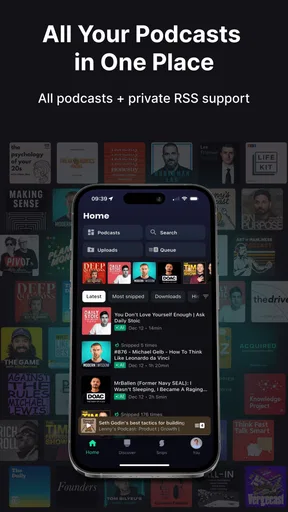
When I first opened the Snipd | AI Podcast Player, I was immediately impressed by its sleek and intuitive interface. The design is clean and modern, making navigation a breeze. It’s clear that the developers put a lot of thought into user experience, and it shows from the get-go.
Discovering Content
One of the standout features of Snipd is its AI-powered content discovery. Unlike other podcast apps that simply recommend shows based on what’s popular, Snipd uses AI to suggest episodes tailored to your interests. I found this particularly useful as it introduced me to podcasts I might never have stumbled upon otherwise.
The app learns from your listening habits and refines its recommendations over time. After just a week of use, I noticed that the suggestions were hitting closer to home, showcasing the app’s ability to really understand its user.
Snip and Save
A feature that truly sets Snipd apart is its ability to "snip" segments of a podcast. How many times have you listened to a brilliant soundbite and wanted to save it for later? With Snipd, you can easily clip segments and save them in a personalized library. It’s like bookmarking for podcasts, and it’s a game-changer.
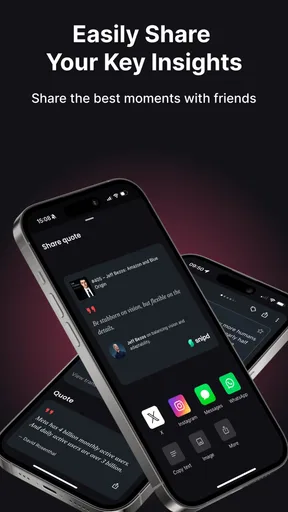
You can also share these snippets with friends or on social media, which is perfect for those moments when you want to spread the word about a particularly insightful episode.
Integration and Usability
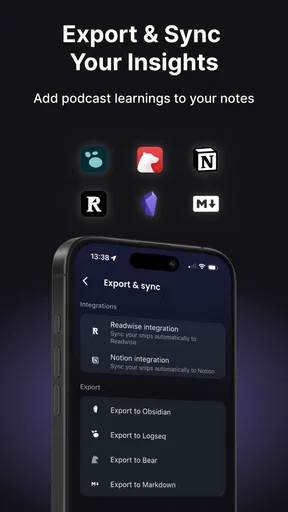
Another cool aspect of Snipd is its seamless integration with other apps and services. Whether you’re using Spotify to stream music or Google Calendar to manage your day, Snipd fits right in. It’s compatible with both Android and iOS, so no matter what device you’re on, you’re covered.
The app also supports offline listening, which is a lifesaver for long flights or when you’re in areas with spotty internet. Just download your episodes beforehand, and you’re good to go.
Room for Improvement
As much as I enjoy using Snipd, there are a few areas where it could improve. For one, the search function, while adequate, sometimes misses the mark on less popular shows. Additionally, while the AI recommendations are great, they can occasionally feel repetitive if you don’t explore new genres regularly.
Another potential drawback is that the app can be a bit resource-heavy. If you’re running it on an older device, you might notice some lag or slower performance.
The Verdict
In conclusion, Snipd | AI Podcast Player is a fantastic tool for any podcast enthusiast looking to enhance their listening experience. It simplifies the process of finding, saving, and sharing content, making it a must-have app for anyone serious about podcasts.
While it has a few minor drawbacks, the overall experience is overwhelmingly positive. With its intuitive design and intelligent features, Snipd has certainly earned a place on my home screen. Give it a try, and I bet you’ll find yourself wondering how you ever managed without it.
Who is likely to get the most from Snipd?
The clearest reason to choose Snipd is wanting a personal trail through the podcasts you hear: not only episodes to play, but moments you may want to remember or pass along. Its store summary describes highlighting and chatting with episodes, and the app’s central appeal is making listening feel more interactive. I would be more cautious about recommending it to someone who is already happy with a basic player and has no interest in collecting or revisiting ideas.
That distinction matters because a feature-rich listening routine can become a burden if it does not solve a real problem. If you often finish an episode and immediately forget which part was useful, Snipd’s snipping approach has a clear purpose. If you only want music or spoken audio on in the background, a simpler option may keep your routine cleaner. The app is rated Teen, has a 4.0 average from around 1.9K ratings, and has over 100K installs; those figures suggest an established audience, but whether its workflow suits you is still a personal call.
Questions worth answering before you commit
Do you need to pay to try it? Snipd is free to install, while in-app purchases are available. I’d start with the free experience and decide whether the core listening and saving habit is useful before considering an optional purchase. The listed price range is broad, so check the exact item and terms shown in the app rather than treating every purchase as interchangeable.
Can it help if you listen offline? Yes, the app supports offline listening, so the sensible approach is to download episodes while you have a reliable connection and confirm they are ready before travelling. This is particularly useful for flights or areas with weak service, but it is still worth leaving room on your device for audio files. If storage is tight, download only the episodes you expect to finish soon and remove them when they are no longer needed.
What should you do if recommendations miss the mark? Use direct search for a known show or subject, and give discovery a little variety by exploring beyond the same narrow topic. Recommendations are most useful as a source of leads, not as a guarantee that every suggestion will match your taste. If you want a particular conversation, searching for it is more dependable than waiting for a feed to surface it.
Is it a replacement for a notes app? I would not treat it as one. A saved podcast moment can preserve context and make a useful reference point, but a note-taking app is often better for turning several ideas into an outline, checklist, or project plan. Snipd makes most sense when the audio itself is the source you want to revisit; your own notes can then capture what you intend to do with the idea.
Finally, should every listener switch? No. I’d recommend trying Snipd if you follow podcasts closely, share memorable moments, or want a more intentional way to return to what you hear. I’d skip it if you want the fewest possible controls, have no use for saved clips, or find recommendation features more distracting than helpful. For me, its strongest case is not that it changes every listening session, but that it gives certain episodes a useful afterlife when a good idea would otherwise disappear as soon as playback ends.
Pros
- AI curates personalized podcast playlists.
- Seamless integration with note-taking apps.
- Offline listening available for convenience.
- User-friendly interface with intuitive design.
- Regular updates enhance app features.
Cons
- Limited podcast library compared to rivals.
- Occasional glitches in AI recommendations.
- Requires stable internet for best performance.
- Some features locked behind a paywall.
- Not available on all mobile platforms.
FAQs for Snipd | AI Podcast Player
What features does Snipd | AI Podcast Player offer?
Snipd | AI Podcast Player provides a seamless podcast listening experience with AI-driven features. It allows users to easily create snippets of their favorite podcast moments, share them with friends, and organize them for later reference. Additionally, its AI capabilities can generate transcripts and highlight key points for more efficient listening.
How does Snipd enhance podcast listening with AI?
Snipd uses AI to transform how you interact with podcasts. It automatically generates transcripts and highlights, making it easier to digest content. The AI can also suggest relevant snippets based on your listening habits, helping you discover new insights and related topics without manual searching.
Is Snipd | AI Podcast Player compatible with all podcast platforms?
Snipd is designed to work with a wide range of podcast platforms, offering a comprehensive library of shows. While it supports many popular podcasts, users should check the app’s compatibility with specific platforms and shows they follow to ensure a seamless experience.
Does Snipd require a subscription or payment?
Snipd offers a free version with basic features, but there may be premium options available for advanced functionalities. These might include enhanced AI features, ad-free listening, or additional customization tools. Users should review the app's pricing structure for detailed information on costs and benefits.
How user-friendly is Snipd for new users?
Snipd is designed with an intuitive interface that caters to both new and experienced podcast listeners. Its user-friendly design makes navigation simple, and AI features are seamlessly integrated to enhance usability. New users can easily learn to create and manage snippets, making the app accessible for all skill levels.


